bitmark Overview

Introduction
As a picture is worth a thousand words, let's start with one.
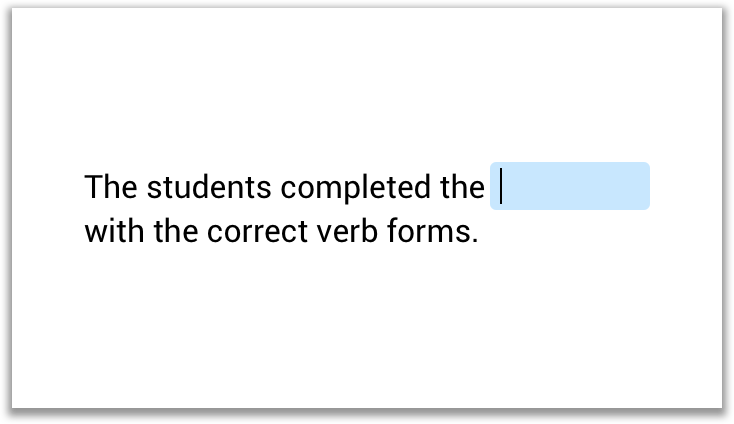
This cloze quiz is described, including its solution, by the following bitmark. Actually, it is described in the bitmark markup language, to be more precise.
[.cloze] The students completed the [_cloze] with the correct verb forms.
What is bitmark?
bitmark describes static and interactive learning material. Its full power shows best, when describing interactive quizzes and their solutions you know from your school books or even flashcards you might know from the fantastic mobile apps like "Quizlet" or "duolingo" or from your favorite LMS.
In contrast to many other formats, bitmark does not include any style or visual information. It is stricly content-first.
Bitmark comes in two flavours. As bitmark markup and as bitmark JSON, the JSON representation of the very same content. The two formats can be transformed from one to the other, using the bitmark parser.
What is bitmark markup?
bitmark is a human (and computer) readable lightweight markup language.
If you know other lightweight markup language like AsciiDoc, CommonMark, Textile or the popular GitHub Flavored Markdown (GFM), just to name a few, bitmark will look very familiar to you.
These markup languages are often used as input format in Wiki's, LMS, CMS, publishing and documentation tools to structure and style text. The output is often html.
In contrast to many other markup languages, bitmark does not include any style or visual information.
Styling and UX, is fully delegated to your app.
Tip
Even though bitmark markup language is an integral part of the bitmark standard, the bitmark API and bitmark JSON DataModel can be used without bitmark markup. bitmark markup is often used in workflows to easily digitize, export or import existing or to create new learning material.
What is bitmark JSON?
bitmark comes in two flavors. One is the bitmark markup language, you have learned about above, and as bitmark JSON, a JSON format.
What is bitmark Bit, bitmark Text and bitmark Book
The bitmark standard is divided into three areas.
bitmark Bit
bitmark Bit is used to describe shareable, self-contained, interactive quiz or static content bits.
It can be used independently from bitmark Text and bitmark Book.
Per default, bitmark Bit is describing quizzes in plain text.
This means for your app, that you don't have to support bitmark Text as long as you are not using semantic information or styled text in your quizzes.
Want to know more about bitmark Bit?
bitmark Text
bitmark Text is a simple way to describe semantics of text, which is displayed in different text styles in your app.
Bitmark text uses a markup that is close to other markup languages. For example, **Wow!** marks the text "Wow!" as important (semantic), which is often displayed as Wow! (text style bold), but could very well be displayed in a larger font and different color in another context.
So, unlike to bitmark Bit und bitmark Book, bitmark Text does not use [ ] for its tags. This reduces the complexity of the parsers massivley. The text format can be parsed independently of the format for interactive bits.
Want to know more about bitmark Text?
bitmark Book
bitmark Book is used to describe a whole Book, not just Bits. It describes the structure and meta data of a Book and references to its Bits which represent the content.
Want to know more about bitmark Book?
bitmark Tags
All bitmark Bit and Book tags start with [ and end with ].
Example
[&image:https://cdn.bitmark.cloud/cat.jpg]
The first character after the opening square bracket is considered a reserved character that defines the role and the format of the tag.
bitmark Example
Let's have a closer look at the example from above.
bitmark
[.cloze] The students completed the [_cloze] with the correct verb forms.
As we have already seen, this bitmark produces the following interactive screen in an app.
bitmark JSON
The bitmark parser reads and validates the bitmark markup and generates a bitmark JSON object. An app uses the bitmark API to receive bitmark JSON objects and render the quiz.
{
    "markup": "[.cloze] The students completed the [_cloze] with the correct verb forms.",
    "bit": {
        "type": "cloze",
        ...
        }
    },
    ...
}
Another Example
bitmark
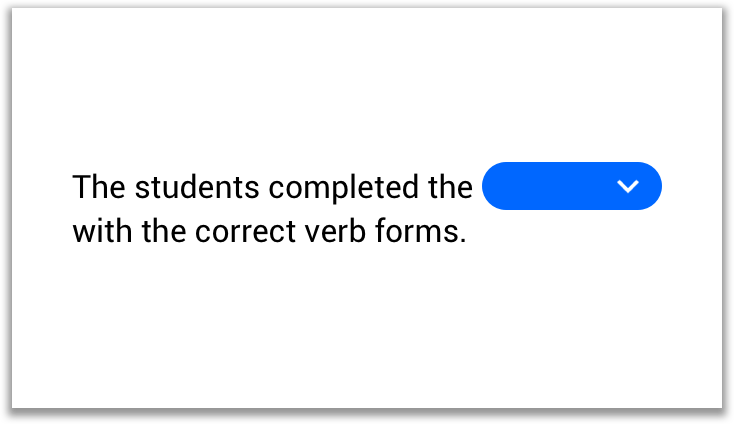
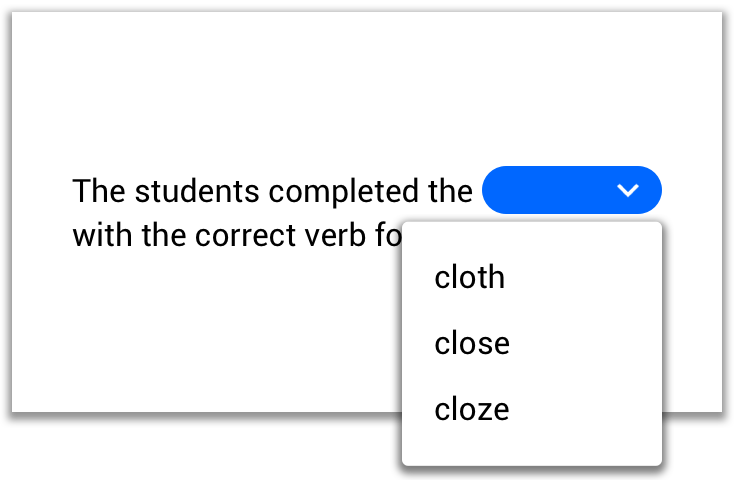
The students completed the [+cloze][-cloth][-close] with the correct verb forms.
The bitmark above produces the following interactive screen in a mobile app.
bitmark Resources
Bits often contain resources like pictures, audio, video, documents, ... Every bit can have one single resource attached by default. For the resource to be recognized, it needs to be declared.
Example of a cloze quiz with an attached image resource. The image is declared in the bit type declaration
[.cloze&image]
[&image:https://cdn.bitmark.cloud/cat.jpg]

The picture shows a [_cat].
bitmark Chains
Chains are a fundamental concept of bitmark. All bitmark tags, that are "glued" together (not separated by a space character), belong to the same object.
Example with one gap with two solutions (the two tags are chained):
The students completed the [_cloze][_gap text] with the correct verb forms.
Example with two gaps in the quiz, tags are not chained, because they are separated by a space character.
The students completed the [_cloze] [_with] the correct verb forms.
A very interesting application of chaining is the use of the bitmark @-Tag.
bitmark Groups
bitmark Groups are used to group several bits.
Groups start with a group born bit [.group*] and end with a group died bit [.group†] (Mac keyboard: option-t). Groups must have a name/id [*my-group-id]. You are completely free to choose the id, but it must be unique within its context. Start and end bit of a group share their id.
[.group*]
[*my-first-group]
[#Title of the group]
And a description.

[.article]
Read this long text first.

[.cloze]
It's [_great] to be able to group several bits in a group.

[.group†]
[*my-first-group]
Groups can overlap. All group bits (with abother id) within a group are ignored.
[.group*][*my-first-group]
[#Title of the group]
And a description.

[.article]
Read this long text first.

[.group*][*all-cloze-bits]
[#Homework]

[.cloze]
It's [_great] to be able to group several bits in a group.

[.group†][*my-first-group]

[.cloze]
It's [_great] to have overlapping groups.

[.group†][*all-cloze-bits]
bitmark [@...] Tag
Set a bitmark JSON property
Not every bitmark JSON property has it's own bitmark tag.
Properties are often provided by another source than bitmark. The author of a Bit, for example, might be determined by the logged in authoring system user and be set directly via API.
Sometimes, bitmark is used as a transfer format between two systems. It is often more comfortable or easy to use bitmark to export data from a legacy system than using JSON at API level. This is another application for the @-Tag.
Example [@context:business] sets the context property to the value "business".
Set a nested property
Nested properties must be written with the dot notation.
Example [@bit.type:cloze]
Population of an Array
Arrays are populated by repeatedly setting a certain property.
Example [@ageRange:18][@ageRange:120] ➔
::JSON "ageRange":[18,120]
Short Tags
Some (important) properties have their own short tags.
Example
[@bit.type:cloze] is the equivalent of [.cloze]
The bit.type property has its own tag: [. ...].
Please find the documentation of these tags here.
bitmark [@...] Tag and Chains
The @-Tag is fully supported in bitmark chains.
This means, that the @-Tag then relates to the chained tag.
Example
[_gap][?This is a hint to solve this gap and not a hint for the whole quiz][@example]
bitmark Separators
Separators are used to separate logical blocks of the content. For example, the content of some Bits is split into different "cards" and stored in the cards array of strings.
| Separators | Description |
|---|---|
== |
EQUAL Separator - Equal separators are mainly used to separate related information like a question and its answer or translations. See example below. |
-- |
OR Separator - Or separators are used to separate variants |
=== |
Hard Split (or Card) Separator - Hard Split separators are used to split and structure content. Each piece will be an entry in an array property. |
Separators must start at line start and be directly followed by a new line character.
Examples
Fussball
==
Football
--
Soccer
"Breakscaping" (Escaping)
bitmark only defines one special character: ^
This character is hidden in rendered text, but it breaks (therefor the term "breakscaping") a bitmark tag, just add a ^ character after the first character of the opening tag. This guarantees high compatibility with other escaping mechanisms.
| Breakscaping | Result |
|---|---|
*^* |
broken bold tag |
This is **bold,** this is *^*not*^* |
|
| This is bold, this is **not** | |
[^.cloze] |
broken cloze tag |
^^ |
^ |
^^^ |
^^ (and so on) |
Where is bitmark supported?
bitmark is supported in most tags. It's easier to define, where it is not supported: It is not supported in properties that contain pure data like urls, solutions for quizzes (like the solution of a cloze). Only plain text is allowed in these properties.
To use bitmark in tags, it must be declared.
| bitmark Declaration | Description |
|---|---|
| [.cloze] | cloze bit supporting plain text only in all its tags (default) |
| [.cloze:bitmark--] | cloze bit supporting bitmark-- in all its tags |
| [.cloze:bitmark++] | cloze bit supporting bitmark-- in its tags, bitmark++ in its content |
Comments
| Comments | Description |
|---|---|
||Internal Comment|| |
Comments are never displayed (to the end user). They are used to comment bitmark source code, mainly by authors during the creation or digitalization of learning material. Book Reader API removes all comments from data. |
bitmark File Extension
bitmark files use the .bitm file extension. In the wild, you will hardly ever come across the .bitm extension. bitmark is rarely used in files. Sometimes the text format and bitmark extensions are combined like .bitm.txt